A fast website is not impressive because Lighthouse gives it a green number. It matters because speed affects almost everything else a website is supposed to do well: usability, conversions, search visibility, mobile experience and even how trustworthy the site feels.
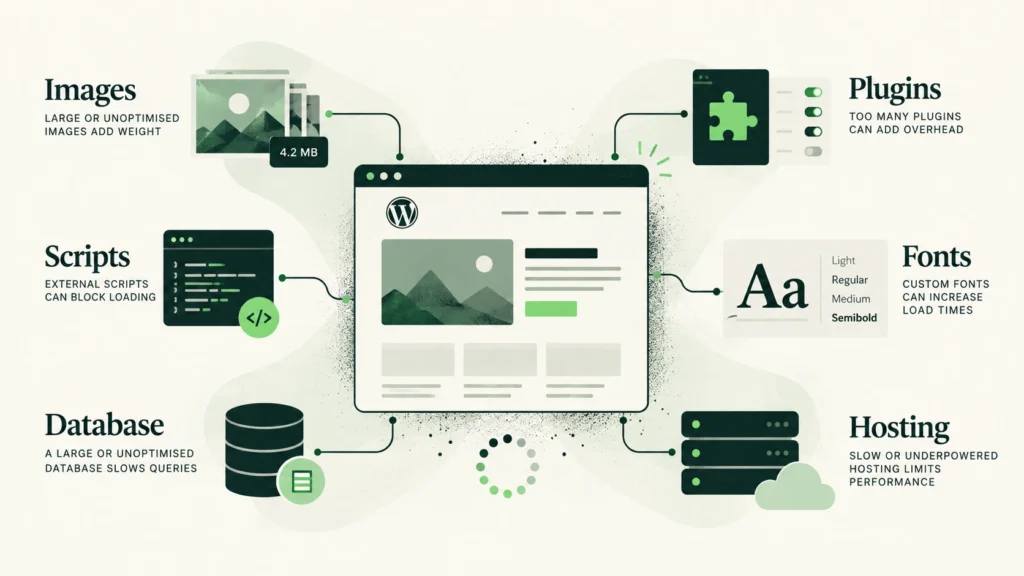
WordPress itself is not inherently slow. Most slow WordPress websites become slow over time because layers accumulate: plugins, scripts, oversized images, tracking code, bloated options, page builders, poorly configured caching and hosting that was never designed for the workload. The result is usually not one dramatic problem. It is ten small ones quietly working together.
Speed is part of the user experience
Visitors do not care why a page is slow. They do not know whether the delay comes from a third-party script, a large hero image, an overloaded database or a hosting plan that costs less than lunch. They simply experience the delay.
Modern performance measurement reflects that reality. Core Web Vitals focus on loading speed, responsiveness and visual stability through metrics such as Largest Contentful Paint, Interaction to Next Paint and Cumulative Layout Shift. The point is not to reward technically neat websites. The point is to measure aspects of the experience users actually feel.
That is also why optimizing WordPress should not mean chasing a perfect test score at any cost. A technically perfect empty page is not useful. The goal is a real website, with real content and functionality, that still feels fast.
WordPress is usually not the problem
WordPress can run extremely quickly. Problems usually appear in the ecosystem built around it.
A typical business website may eventually contain a theme with its own framework, a page builder, dozens of plugins, analytics and advertising scripts, cookie consent software, chat widgets, external fonts, large image libraries, security tools, backup systems, SEO plugins, forms and integrations with CRMs, couriers, payment processors or external APIs.
Every one of those can be perfectly reasonable. The problem begins when nobody looks at their combined cost.
This is why installing another “speed optimization plugin” is rarely the first thing I recommend. Sometimes it helps. Sometimes it merely adds another layer to the pile.
Images are still one of the easiest ways to make a site slow
High-resolution images are useful. Uploading a 6 MB photograph and displaying it at 700 pixels wide is not.
WordPress can generate multiple image sizes and expose them through responsive markup, allowing the browser to choose an appropriate file for the visitor’s device. But responsive delivery cannot rescue every bad decision.
Image performance still depends on uploading sensible source files, choosing appropriate dimensions, using efficient formats such as WebP or AVIF where appropriate, avoiding unnecessarily large background images, lazy-loading images below the fold and not lazy-loading the image that is critical to the initial viewport.
On many websites, fixing image delivery produces a visible improvement without touching a single plugin.

Plugins are not slow simply because there are many of them
The popular rule that “too many plugins make WordPress slow” is only partly useful. Twenty lightweight plugins can be cheaper than one badly designed plugin.
What matters is what they do.
A plugin can affect performance by loading CSS or JavaScript on every page, making expensive database queries, calling external services, adding large amounts of autoloaded data, running unnecessary background processes or generating dynamic content that prevents effective caching.
So the right question is not “How many plugins does the site have?” It is “What does each plugin cost on the pages where it runs?”
That distinction matters when working on existing WordPress websites. Removing plugins indiscriminately can break business functionality without solving the actual bottleneck.
Database bloat can become surprisingly expensive
This is one of the less visible WordPress performance problems.
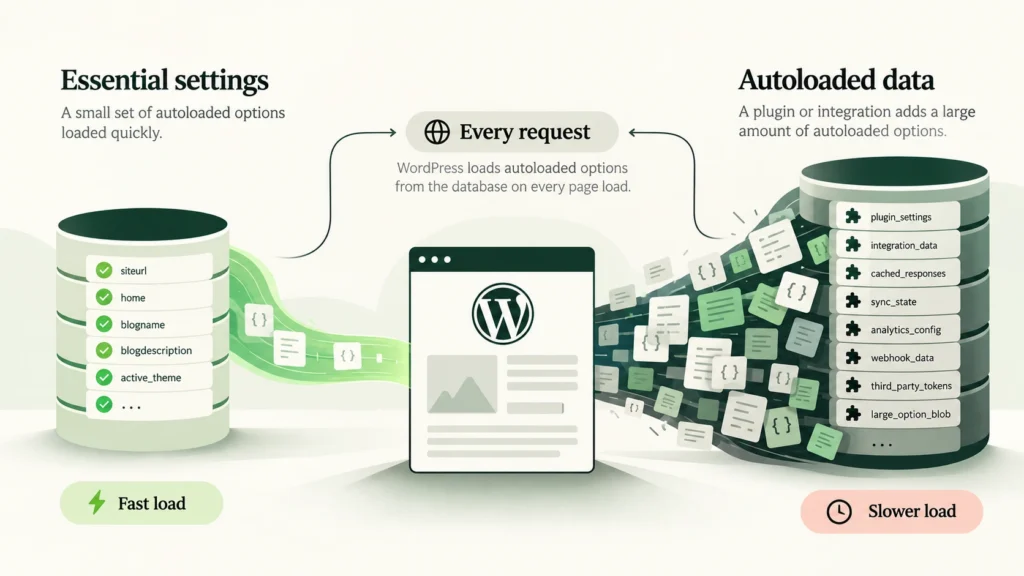
WordPress stores a large amount of configuration data in the wp_options table. Some options are marked as autoloaded, meaning they are loaded automatically during WordPress requests.
That is useful for small settings needed everywhere. It becomes less useful when plugins store large datasets there and request that they be loaded on every page.
This is a good example of why performance work sometimes needs to go below the visible page. A website can have optimized images and clean CSS and still waste resources loading hundreds of kilobytes of configuration data on every request.
I have encountered this on real WooCommerce installations where third-party integrations stored very large transient or option values in autoloaded data. The problem was invisible in the page editor and had nothing to do with the homepage design.
Caching helps, but it is not magic
Caching is one of the most effective tools available for WordPress. Page caching can avoid rebuilding the same page for every visitor, browser caching can prevent static assets from being downloaded repeatedly, and object caching can reduce repeated database work.
But caching cannot fix everything.
If a page contains several megabytes of unnecessary imagery, render-blocking font files, multiple third-party JavaScript tags, layout shifts or badly configured WooCommerce fragments, serving the HTML faster does not suddenly make the entire user experience fast.
Caching should support a good implementation, not hide a bad one.
Fonts and third-party scripts often escape attention
Fonts are another common example. A website might load four families, each in five weights, although the design visibly uses only two.
Marketing scripts can be worse. Analytics, advertising pixels, heatmaps, chat systems, embedded videos and cookie platforms can each add network requests and JavaScript work.
Unlike your own code, you often cannot optimize the contents of these scripts. The real decisions may be whether they are necessary, where they load, when they load and whether a lighter alternative exists.
This is one reason I prefer starting with a lightweight WordPress setup. Every dependency added later has a performance budget to spend.
WooCommerce changes the equation
A WooCommerce store is not simply a WordPress site with product images.
Parts of the site are dynamic: cart, checkout, customer account, stock information, pricing, shipping, payment integrations and product filters. Caching must therefore be more carefully configured than on a mostly static company website.
Large product catalogues introduce another dimension. Database queries, product variations, filtering and third-party integrations can become much more important than the weight of the homepage.
Performance work on WooCommerce often requires understanding the store’s actual workflow rather than applying a generic cache preset and declaring victory.
Hosting matters, but moving servers is not always the first answer
Hosting sets the ceiling for what the site can do efficiently. CPU, memory, storage performance, PHP configuration, database performance and server-level caching all matter.
But upgrading hosting before diagnosing the website can simply give inefficient code more resources to waste.
I prefer to know where the bottleneck is first. Sometimes the answer really is better hosting. Sometimes it is one plugin. Sometimes it is a 2 MB font collection that nobody remembers installing.
A fast website is usually the result of many boring decisions
There is rarely one dramatic optimization that transforms a WordPress website.
Good performance usually comes from a series of decisions: choosing a lightweight foundation, keeping dependencies under control, loading assets only where they are needed, optimizing images, managing fonts, configuring caching correctly, watching database growth, removing obsolete functionality and testing real pages on real devices.
None of these sounds particularly glamorous. Together, they make a substantial difference.
Performance should be designed in, not repaired later
The easiest website to optimize is the one that was built with performance in mind from the beginning. That does not mean refusing useful functionality to protect a Lighthouse score. It means understanding the cost of each decision.
For an existing site, the same principle applies in reverse: diagnose first, then optimize what actually matters instead of installing another plugin and hoping for a miracle.
On one of my client projects, Magic Clean, that approach currently produces a Lighthouse result of 99 / 100 / 100 / 100 on the live site.
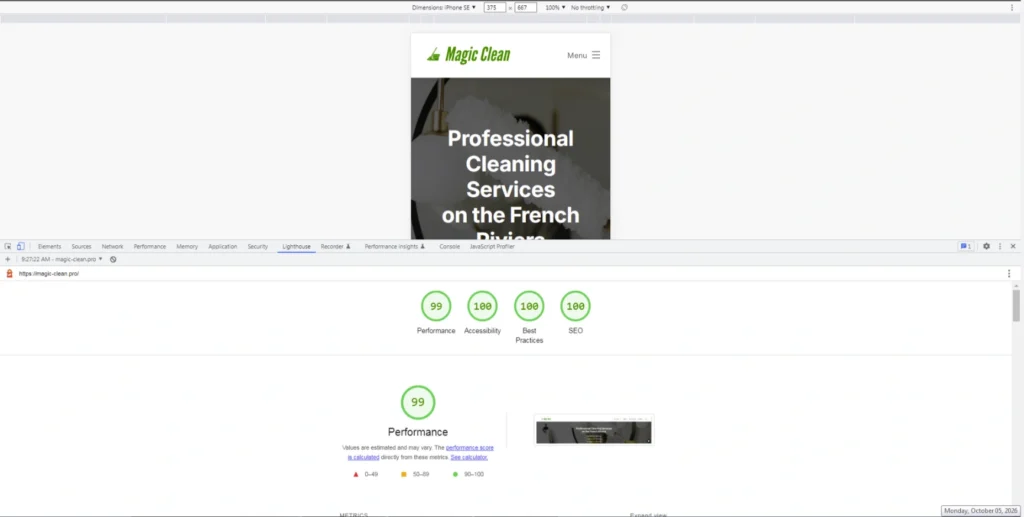
The number is satisfying. The more important result is that the site remains a real multilingual business website with images, forms, SEO content and normal functionality while achieving it.
That is the standard I find more useful than performance theatre.